I. Introduction — Why Image Background Removal Matters
Removing image backgrounds can transform a basic image into a professional, polished asset. Whether you’re editing product shots for eCommerce, creating profile photos, or designing marketing materials, background removal makes your images cleaner, clearer, and more adaptable.
Before AI, creators relied on tools like Photoshop or GIMP, using manual selections and masks. Today, AI‑powered tools make background removal instant—no graphic design degree required. Let’s explore both methods and find out which suits your needs best.
II. Traditional Background Removal Techniques
A. Manual Editing in Photoshop
- Open your image and duplicate the base layer.
- Use selection tools — Quick Selection, Magic Wand, or Pen Tool — to isolate your subject.
- Apply a Layer Mask to remove the background.
- Use Select and Mask to refine edges (especially hair or fur).
- Export as PNG for transparency.
B. Pros and Cons
| Pros | Cons |
|---|---|
| Maximum precision and control | Time‑consuming |
| Excellent for detailed edges | Requires skill and patience |
| Works offline | Not ideal for batches |
III. Background Removal with AI Tools
A. Midjourney Workflow
Midjourney isn’t a cutout tool but excels at generating isolated subjects with clean, minimal backgrounds.
Prompt Examples:
- “Realistic portrait of a golden retriever, isolated, plain white background.”
- “Product photo of sneakers, white studio background, focus on subject.”
Workflow Diagram: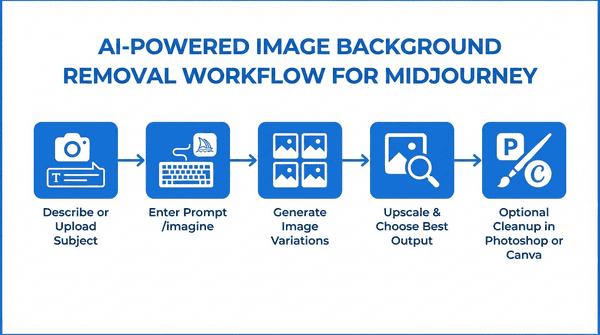
Tip: Use “no background,” “isolated subject,” or “studio lighting” keywords for clean, cutout‑ready results.
B. Nano Banana Workflow
Nano Banana is the simplest cloud‑based background remover powered by AI segmentation.
How it Works:
- Upload your image.
- AI instantly detects the subject.
- Preview and download the transparent PNG.
Workflow Diagram: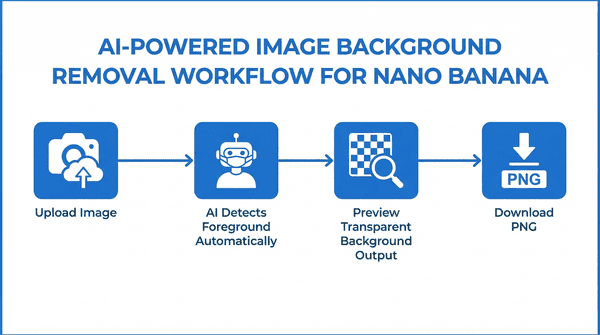
Pros:
- Fast and intuitive
- Accurate edge detection
- No prompt needed
C. DALL‑E Workflow
DALL‑E uses inpainting to remove or replace backgrounds, providing creative flexibility.
Steps:
- Upload your photo.
- Use the eraser to clear background areas.
- Prompt DALL‑E: “Remove background and leave subject on white.”
- Generate and download.
Workflow Diagram: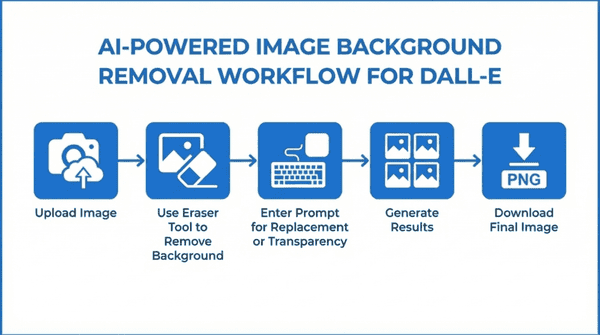
Tip: Combine with Photoshop or Canva for final transparency output.
D. Stable Diffusion Workflow
Stable Diffusion offers precision through inpainting, ControlNet, and SAM extensions.
Steps:
- Load your image into WebUI or ComfyUI.
- Select the inpaint or masking tool.
- Paint over the background area to remove.
- Use a prompt like: “Keep subject in focus, remove background, transparent or plain white.”
Workflow Diagram: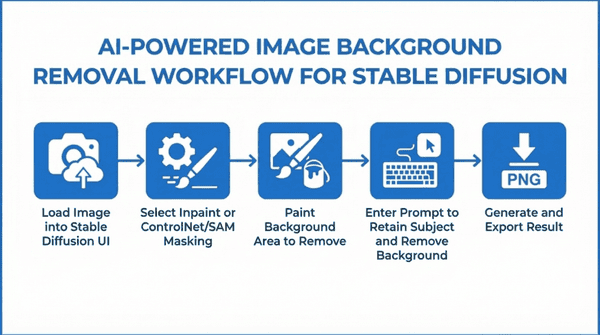
Advanced Tip: Use extensions like ReActor or Segment Anything for next‑level image masking automation.
IV. Comparison Table — Traditional vs AI Background Removal
| Tool | Accuracy | Ease | Speed | Cost | Customization |
|---|---|---|---|---|---|
| Photoshop | ⭐⭐⭐⭐ | ⭐⭐ | ⭐⭐ | Paid | Very High |
| Midjourney | ⭐⭐⭐ | ⭐⭐⭐ | ⭐⭐⭐ | Paid | Moderate |
| Nano Banana | ⭐⭐⭐⭐ | ⭐⭐⭐⭐ | ⭐⭐⭐⭐ | Free/Paid | Low |
| DALL‑E | ⭐⭐⭐⭐ | ⭐⭐⭐ | ⭐⭐⭐ | Paid | Moderate |
| Stable Diffusion | ⭐⭐⭐⭐ | ⭐ | ⭐⭐ | Free | Extreme |
V. Which Tool Should You Use?
- Beginners → Choose Nano Banana for quick transparent cutouts.
- Intermediate creatives → Try DALL‑E or Midjourney for stylistic isolation.
- Advanced users → Stable Diffusion or Photoshop for ultimate control.
For the best results, you can even combine them:
🧠 Example workflow: Midjourney (generate subject) → Nano Banana (remove background) → Photoshop (refine edges).
VI. Future of Background Removal
Expect continued innovation in real‑time background detection, video background removal, and cross‑tool integration. AI is making what used to take hours achievable in seconds—while still giving professionals the tools for fine‑tuning and creative direction.
✅ SEO Keywords (use in Yoast or RankMath):
AI background remover, remove image background, how to remove background, DALL‑E background removal, Midjourney background editing, Stable Diffusion workflow, photo editor tips, Nano Banana AI, Photoshop alternatives, AI image tools
Why pay numerous subscriptions to various different AI platforms and programs when you can access 3000 AI tools for just $15 a month? All the latest tools, image and video generators, AI Chat, etc.
Save hundreds of dollars…
CLICK HERE to try it out and get FREE daily credits too!
If you want assistance with this article, please Contact Us